
Copilot+ PC: Click to Do and Recall
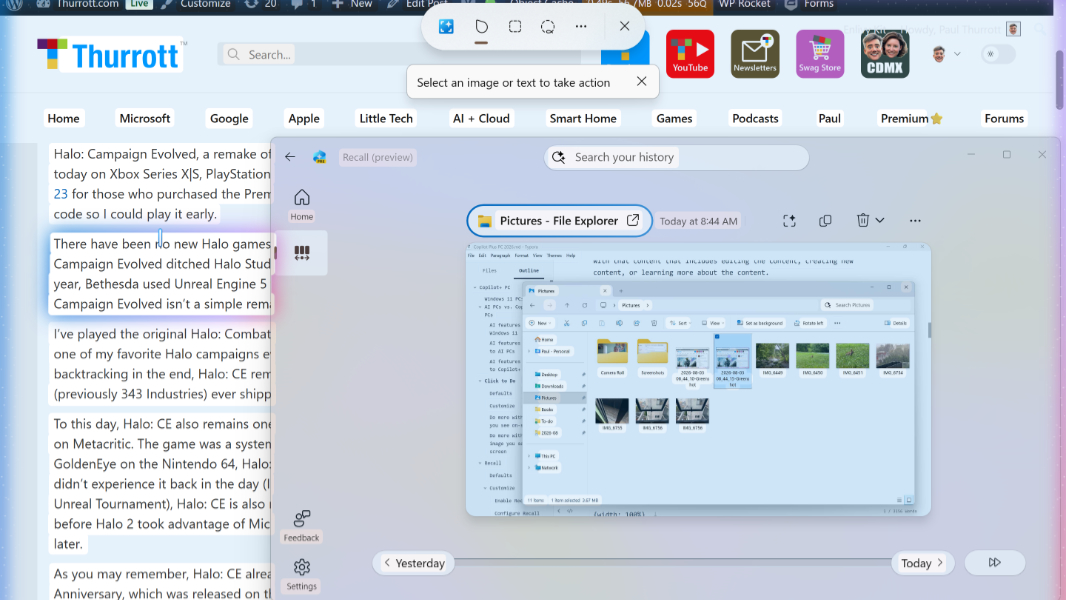
Source: thurrott.com
Windows 11 supports numerous AI capabilities, but the best experiences require a Copilot+ PC, a new class of AI PC that includes a powerful and efficient Neural Processing Unit (NPU). Copilot+ PCs can run sophisticated AI workloads locally–on-device–against Small Language Models (SMLs), so these features don’t require an Internet connection or a paid, cloud-based AI service. Granted, you don’t need a Copilot+ PC to use many of the AI features that Windows 11 offers. Those AI features that rely on cloud-hosted Large Language Models (LLMs) are available to all Windows 11 users, albeit with a few limitations: Connectivity. Your PC must be online to access these AI features. Subscription. Most of the cloud-based AI features in Windows 11 have usage limits unless you pay for a Microsoft 365 Personal, Family, or Premium subscription. With a Copilot+ PC, you get the best of both worlds: All the AI features that Windows 11 offers plus all the local AI features that are unique to AI PCs and Copilot+ PCs. Windows 11 includes a growing set of AI features integrated throughout the system and in its in-box apps. Many of these features provide so-called generative AI capabilities, meaning they can be used to create new content or edit existing content. Some key examples include Copilot in Windows 11, Copilot in Microsoft Edge, Notepad’s Writing tools, Paint’s Remove background,
SUCKS 0
0
0
Comments
This page shows all existing comments. To add a new comment, open the post in the forum.
No comments yet.